Weld Strength Calculator
Enter the fillet weld leg, length and electrode to get the load the weld carries, or the weld size or length a load needs.
The Weld Strength Calculator estimates how much load a fillet weld or a complete joint penetration (CJP) groove weld can carry, and it can also work backward to find the weld size or length you need for a given load. It runs in your browser, is free, and needs no sign-up. You enter the weld type, the size, the filler metal strength, and the design method, and the results update as you type.
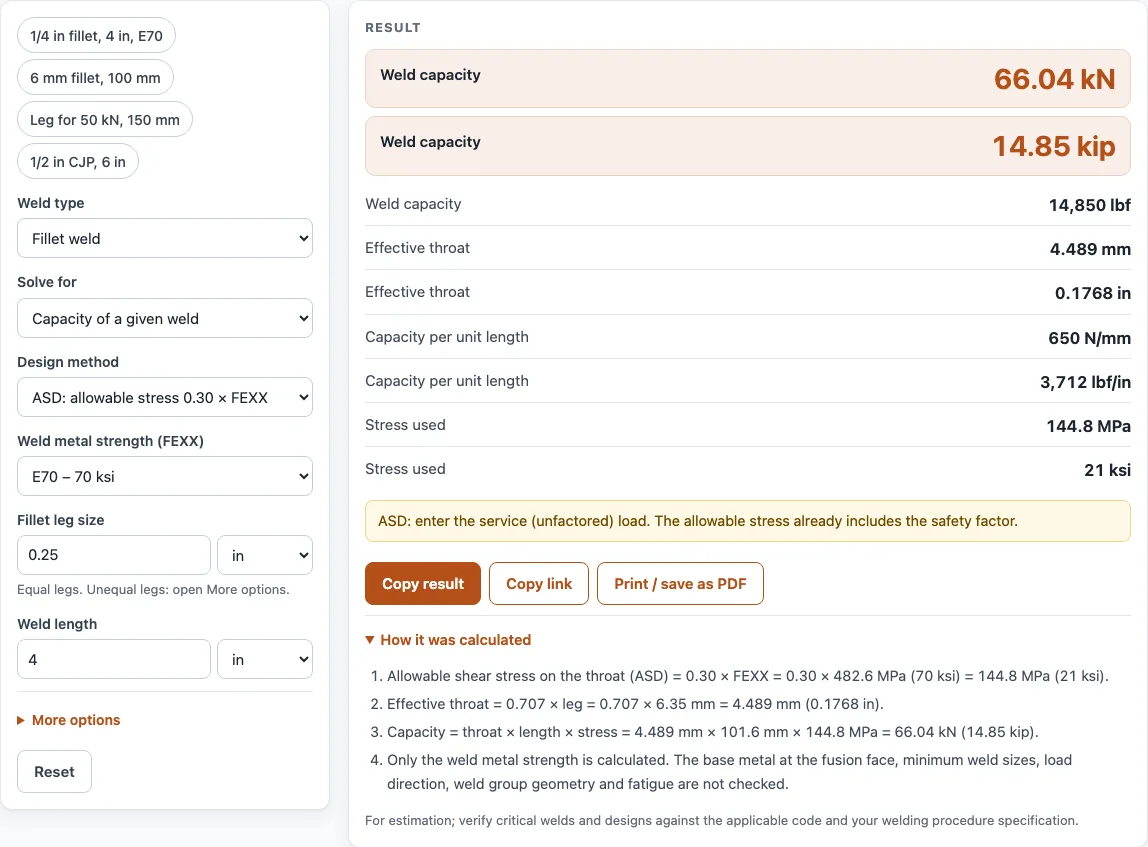
The tool covers three modes: capacity of a weld you have specified, the required fillet leg or CJP thickness for a load, and the required length for a load. It reports results in kN, kip, and lbf, and it shows the effective throat, the capacity per unit length, and the stress used. The steps behind each result are listed so you can check the work.
How to use the Weld Strength Calculator
- Choose the weld type: fillet weld, or complete joint penetration (CJP) groove weld in a butt joint.
- Choose the mode: capacity of a given weld, required size (fillet leg or CJP thickness) for a load, or required length for a load.
- Enter the weld size. For a fillet, enter the leg. For a CJP weld, enter the thickness. Use inches or millimetres to match your drawing.
- Enter the length of the weld.
- For a fillet weld, select the filler metal strength: E60, E70, or E80 (60, 70, or 80 ksi), or 415, 485, or 550 MPa (the same three strengths converted to MPa).
- For a CJP weld, enter the base metal strength you are using.
- Select the design method: ASD, LRFD, or your own allowable shear stress.
- If the legs are unequal, open More options and enter the second leg.
- If you are solving for a required size or length, enter the load.
- Read the results. They update as you type.
Open “How it was calculated” to see the formula and each step with your numbers. Copy result copies the result lines with a link. Copy link copies the page address, which stores every input, so opening it later restores the same calculation. Print / save as PDF prints the inputs, results, calculation steps, and the date.
How do you calculate fillet weld strength?
Multiply the effective throat by the weld length and by the allowable shear stress for the filler metal. That gives the capacity of the weld. The effective throat is the thickness of the weld measured across the triangle, and it is smaller than the leg, so the strength depends on the throat, not the leg.
What is the throat of a fillet weld?
The throat is the shortest distance from the root of a fillet weld to its face. For equal legs, the throat equals 0.707 × leg. For unequal legs a and b, the throat is a × b ÷ √(a² + b²), which is the value the tool uses when you enter a second leg under More options.
What size fillet weld do I need?
Divide the load by the allowable stress and by the length to get the required throat, then divide the throat by 0.707 to get the leg. For example, a 50 kN load on a 150 mm weld using 485 MPa filler strength in ASD needs a 3.24 mm leg. This assumes equal legs. Select the required size mode to run this calculation.
What is the allowable stress for an E70 weld?
In ASD, the allowable shear stress is 0.30 × FEXX, so for E70 it is 0.30 × 70 ksi = 21 ksi. In LRFD, the design strength is φ × 0.60 × FEXX with φ = 0.75, which gives 0.45 × 70 = 31.5 ksi. The ASD value already includes the safety factor, so it is used with service loads.
How strong is a 1/4 inch fillet weld per inch?
A 1/4 inch equal-leg fillet has a throat of 0.707 × 0.25 = 0.177 in. At an ASD allowable of 21 ksi for E70, it carries 0.177 × 21 = 3.71 kip per inch of length. Over the 4 in example weld, that is 14.85 kip (66.0 kN).
Sources
Checked October 2026:
- Project Materials, Fillet weld strength: throat = 0.707 × leg and the ASD allowable shear of 0.30 × FEXX on the throat
- IDEA StatiCa, Check of welds according to AISC: LRFD φ = 0.75 on 0.60 FEXX and the (1.0 + 0.5 sin^1.5 θ) direction factor, which this tool does not use
- 415, 485 and 550 MPa are 60, 70 and 80 ksi converted
For estimation; verify critical designs against the applicable standard.
Worked examples
| Input | Result |
|---|---|
| Fillet weld, 0.25 in, E70 – 70 ksi, ASD, 4 in | 66.04 kN = 14.85 kip |
| Fillet weld, 6 mm, 485 MPa (70 ksi converted), ASD, 100 mm | 61.72 kN = 13.88 kip |
| Fillet weld, 6 mm, 485 MPa (70 ksi converted), LRFD, 100 mm | 92.58 kN = 20.81 kip |
| Fillet weld, 485 MPa (70 ksi converted), ASD, 150 mm, 50 kN | 3.24 mm = 0.1276 in |
| Fillet weld, 0.25 in, E70 – 70 ksi, ASD, 10 kip | 68.43 mm = 2.694 in |
| Butt joint, complete penetration (CJP) groove weld, 0.5 in, 36 ksi, 6 in | 480.4 kN = 108 kip |
Calculated by the tool above with these values.
Frequently asked questions
Can I use this tool for a butt joint?
Yes, for a complete joint penetration (CJP) groove weld in a butt joint. Its capacity is the base metal strength you enter, times the thickness, times the length.
What is the difference between ASD and LRFD?
ASD uses service loads, and its allowable stress already includes the safety factor. LRFD uses factored loads with a design strength that includes φ. Use the method your code or specification requires.
Does the calculator check minimum or maximum weld sizes?
No. Minimum and maximum fillet sizes, base metal checks, and the effect of load direction are set by the applicable code and are not checked by this tool. Confirm them separately.
Can I use the results in a quote, procedure, or report?
Yes. The results may be used in commercial work, such as quotes, welding procedure planning, shop paperwork, and reports, without attribution.
Does it work on a phone?
Yes. The calculator runs in the browser, so it works on a phone. Nothing you enter is uploaded.
Can I enter my own allowable stress?
Yes. Choose ‘My own allowable shear stress’ and enter the value from your code or specification.
Which units can I use?
Leg, throat and length in mm or inches, loads in kN, kip or lbf.
Related tools
- Welding symbol chart: use it to confirm the weld symbol and dimensions to show on your drawing.
- Stitch weld calculator: use it when the weld is made as a series of short segments with gaps.
- Welding rod chart: use it to pick a filler metal class to match your design.
- Carbon equivalent calculator: use it to assess how a base metal may respond to welding.
- Welding cost calculator: use it to estimate labor and material cost once you know the weld size and length.
- All welding calculators: use it to browse every calculator on the site.