Welding Rod Chart (Electrode Decoder)
Type a stick electrode classification such as E7018 to read its tensile strength, welding positions, coating and current, or browse the chart.
This welding rod chart is a free electrode decoder that tells you what a stick welding rod classification means. Type a code such as E7018 or E6011 into the tool, and it shows the rod’s minimum tensile strength, welding positions, coating type and current type. The same classification system covers SMAW rods, also called stick welding rods or electrodes.
The tool runs in your browser, so there is nothing to install and nothing is uploaded. A chart below the tool decodes the common rods: E6010, E6011, E6012, E6013, E7014, E7016, E7018, E7024 and E7028. Use it when you have a rod box or data sheet with a code on it and want to know what that code describes before you strike an arc. The decoder reads the classification only. For amperage and settings, you need the electrode maker’s data.
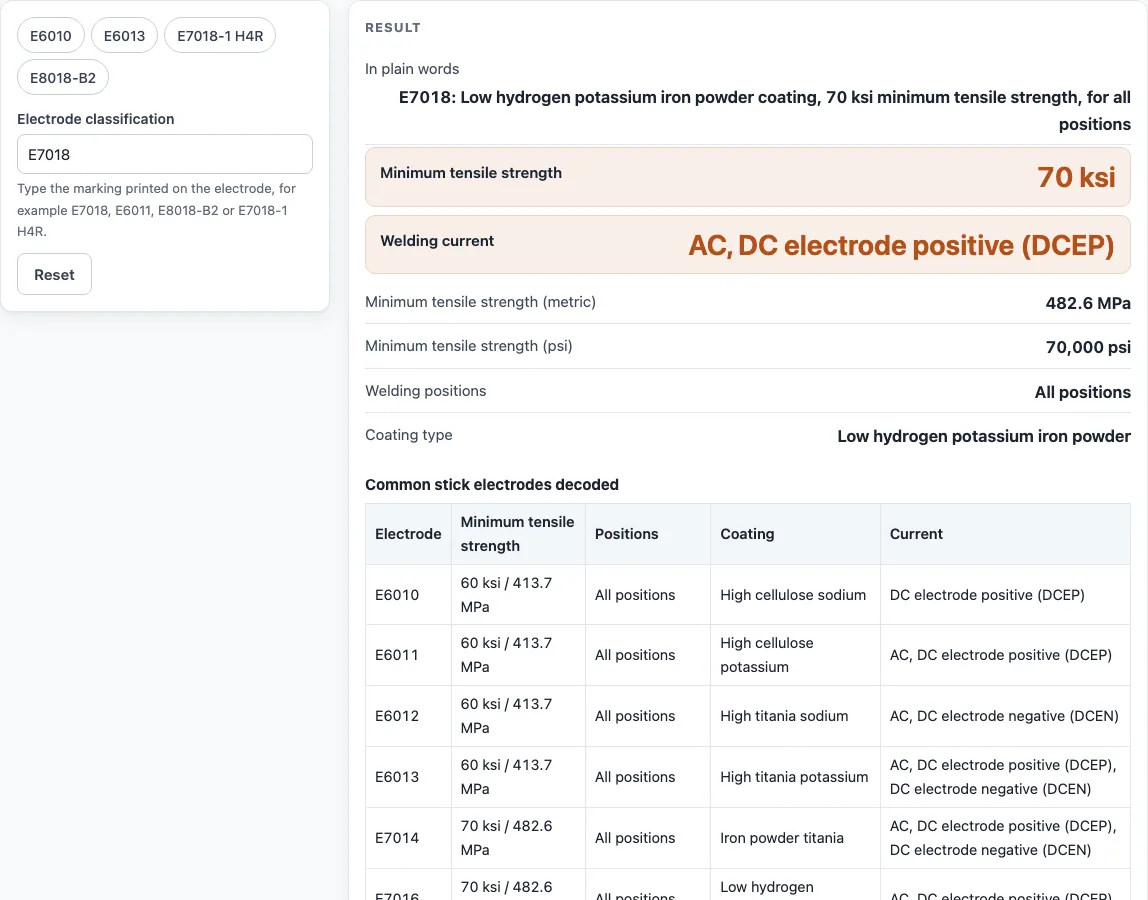
How to use the welding rod decoder
- Find the classification printed on the rod box or the maker’s data sheet, for example E7018 or E7018-1 H4R.
- Click the entry field at the top of the tool and type the code. Include any suffix, such as the -1 or H4R, exactly as printed.
- Read the result as you type. The results update with each character, so you can fix a typing mistake straight away.
- Check the strength, positions, coating and current lines against the rod you have in hand.
- Open “How it was calculated” to see the formula and each step worked out with your code.
- Scan the chart below the tool if you want to compare common rods side by side.
Copy result copies the result lines with a link. Copy link copies the page address, which stores your input as ?s=…, so opening that address later restores the same calculation. Print / save as PDF prints the inputs, results, calculation steps and the date, which is useful for keeping a record in the shop. The tool also works on a phone.
The presets load E6010, E6013, E7018-1 H4R and E8018-B2.
Type the code with or without spaces; case does not matter.
What do the numbers on a welding rod mean?
A welding rod classification is a code in which each group of digits describes one property of the rod. The first two or three digits give the minimum tensile strength in ksi, so 60 means 60,000 psi, and the strength is also shown in MPa. The next digit gives the welding positions, and the last two digits give the coating and the current type.
What does E7018 mean?
E7018 is a stick electrode with a minimum tensile strength of 70 ksi, rated for all positions, with a low-hydrogen potassium iron powder coating that runs on AC or DCEP. The E stands for electrode, 70 is the strength, the 1 is the position code, and 18 is the coating and current code. Reading the code this way lets you check any other rod the same way.
What is the difference between 6011 and 6013?
E6011 and E6013 both have a 60 ksi minimum tensile strength and are rated for all positions, so the difference lies in the coating and current. E6011 has a high-cellulose potassium coating that runs on AC or DCEP. E6013 has a high-titania potassium coating that runs on AC, DCEP or DCEN. Check that your machine supports the current listed for the rod you choose.
What does the H4R suffix mean?
H4R is a suffix that adds two properties to the classification. The H4 part means the weld metal contains no more than 4 ml of diffusible hydrogen per 100 g of weld metal, and the R part means the coating is moisture-resistant. You will see it on codes such as E7018-1 H4R, which adds the improved-toughness -1 suffix to the same H4R properties.
Which welding rods are all-position?
A rod is all-position when the digit that sits just before the final two digits is 1. Among the chart rods, E6010, E6011, E6012, E6013, E7014, E7016 and E7018 are all-position. E7024 and E7028 carry a 2 in that place, which means flat and horizontal fillet welds only. A 4 in that place means flat, horizontal, overhead and vertical-down positions.
What does the last digit on a welding rod mean?
The last digit does not have a separate meaning on its own. The final two digits together give the coating and the current type. For example, the final two digits of E7018 are 18, which is a low-hydrogen potassium iron powder coating for AC or DCEP. Codes 10 to 13 are high-cellulose or high-titania coatings, while 15, 16 and 18 are low-hydrogen coatings.
Sources
Checked October 2026:
- AWS SFA-5.1 specification (2001 edition copy), table 1, for the coating and current codes and the -1 suffix of E7016 and E7018
- Red-D-Arc electrode classification chart for the A5.5 alloy suffixes (A1, B1–B3, C1–C3, D1–D3, G) and the -1 suffix of E7018 and E7024
- Hobart, Understanding AWS classifications for the digit positions; MPa values are converted from ksi
For estimation; verify critical designs against the applicable standard.
Worked examples
| Input | Result |
|---|---|
| E7018 | E7018: Low hydrogen potassium iron powder coating, 70 ksi minimum tensile strength, for all positions |
| E6011 | E6011: High cellulose potassium coating, 60 ksi minimum tensile strength, for all positions |
| E6013 | E6013: High titania potassium coating, 60 ksi minimum tensile strength, for all positions |
| E8018-B2 | E8018-B2: Low hydrogen potassium iron powder coating, 80 ksi minimum tensile strength, for all positions |
| E7018-1 H4R | E7018-1 H4R: Low hydrogen potassium iron powder coating, 70 ksi minimum tensile strength, for all positions |
Calculated by the tool above with these values.
Frequently asked questions
Does the chart show amperage for a 1/8 inch 7018 rod?
No. The tool decodes the classification only and does not give an amperage chart. Amperage, polarity details and storage come from the electrode maker’s data for that rod, so check the box or data sheet for the diameter you are using.
Is the rod diameter part of the classification?
No. The code shows strength, positions, coating and current, but it does not include the electrode diameter. The maker lists diameter separately, so compare the diameter on the box with your settings from the maker’s data.
Can I use the results in quotes or shop paperwork?
Yes. Results may be used in commercial work, such as quotes, welding procedure planning, shop paperwork and reports, without attribution. Print / save as PDF gives you a dated copy of the inputs and calculation steps for your files.
Does the tool work on a phone?
Yes. The tool works on a phone, so you can check a code while you are at the rod storage or on site. Copy link is useful here, because it saves your code in the address and brings the same result back when you open it again.
Related tools
- Welding symbol chart: use it when you need to read the symbols on a drawing that show weld type and size.
- Weld strength calculator: use it when you want to estimate the strength of a weld joint.
- Carbon equivalent calculator: use it when you need to assess the carbon equivalent of a steel before welding.
- Welding shade chart: use it when you need to pick a filter shade for arc welding or cutting.
- MIG wire size chart: use it when you are choosing wire for MIG welding rather than stick rods.
- All welding calculators: use it when you want to browse every calculator and chart on the site.