Welding Shade Chart
Pick the process and enter the current or plate thickness to get the minimum and suggested shade number for your welding lens.
The welding shade chart on this page tells you the minimum and suggested lens shade for a welding or cutting process at a given current, or for gas work at a given metal thickness. Enter your process and value, and the tool returns the shade to use. It is the same kind of reference you would find on a welding lens shade chart, welding mask shade chart, or welding helmet shade chart, with the numbers taken from the OSHA table in 29 CFR 1910.252(b)(2)(ii)(H).
The tool runs in your browser. It is free, needs no sign-up, and uploads nothing. It also works on a phone, so you can check a shade at the machine or on the shop floor.
Use it before you strike an arc. A shade that is too light can cause eye damage from the arc, so confirm the number for your exact process and current every time.
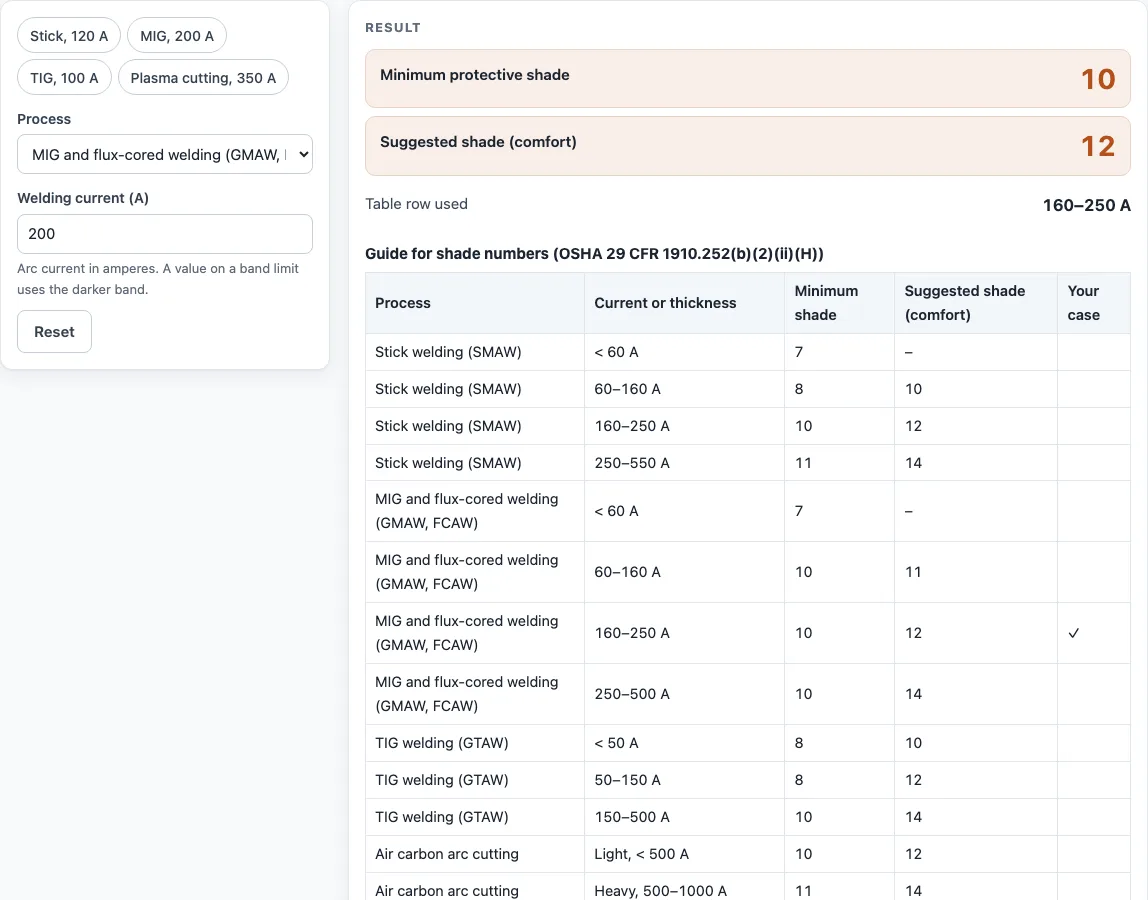
How to use the Welding Shade Chart
- Select your process from the process list, such as stick (SMAW), MIG or flux-cored (GMAW, FCAW), TIG (GTAW), plasma cutting, or oxygen cutting.
- Enter the welding current in amps for arc processes. For gas welding and oxygen cutting, enter the metal thickness in mm or in instead.
- Read the minimum shade and the suggested shade in the results. The table row used for your input is shown with them.
- If your current sits exactly on a row limit, the tool uses the darker row and shows a warning. Check that the darker shade is the one you want.
- Scroll to the full table, where your row is marked, to see the neighbouring ranges for the same process.
Results update as you type, so you can change the current or process and watch the shade change. “How it was calculated” lists the steps with your numbers. Copy result copies the result lines with a link. Copy link copies the page address, which stores every input, so opening it later restores the same calculation. Print / save as PDF prints the inputs, results, calculation steps and the date.
The presets show stick at 120 A, MIG at 200 A, TIG at 100 A and plasma cutting at 350 A.
What shade should I use for welding?
The shade depends on the process and the current, so there is no single number for all welding. Look up your process and amperage in the table, then use the minimum shade as the lowest safe choice. The suggested shade is often more comfortable for seeing the weld pool.
OSHA’s rule is to start with a shade too dark to see the weld zone, then move to a lighter shade until you can see the weld zone well. Never go below the minimum.
What shade for MIG welding?
For MIG (GMAW) and flux-cored (FCAW) welding, the minimum shade is 7 under 60 A and 10 from 60 A up to 500 A. The suggested shade is 11 from 60 A to 160 A, 12 from 160 A to 250 A, and 14 from 250 A to 500 A. At 200 A, the tool returns a minimum of 10 and a suggested shade of 12.
What shade for TIG welding?
For TIG (GTAW) welding, the minimum shade is 8 under 50 A and between 50 A and 150 A, rising to 10 from 150 A to 500 A. The suggested shade is 10 under 50 A, 12 from 50 A to 150 A, and 14 from 150 A to 500 A. At 100 A, the result is a minimum of 8 and a suggested shade of 12.
What shade for stick welding at 100 amps?
For stick (SMAW) welding at 100 A, use a minimum shade of 8 and a suggested shade of 10. This falls in the 60 A to 160 A row. If you prefer a darker view, the suggested shade is a comfortable starting point, and you can go darker without dropping below the minimum.
What shade for plasma cutting?
For plasma arc cutting, the shade depends on whether the cut is light, medium, or heavy. Light cutting under 300 A needs a minimum of 8 and a suggested shade of 9. Medium cutting from 300 A to 400 A needs a minimum of 9 and a suggested shade of 12. Heavy cutting from 400 A to 800 A needs a minimum of 10 and a suggested shade of 14. At 350 A, the tool returns a minimum of 9 and a suggested shade of 12.
What shade for oxy-acetylene cutting and brazing?
For oxygen cutting, the shade depends on the metal thickness. OSHA’s minimum is 3 under 1 in, 4 from 1 in to 6 in and 5 over 6 in; the ANSI/AWS suggestions are 3 or 4, 4 or 5, and 5 or 6. For torch brazing the minimum is 3 (suggested 3 or 4), and for torch soldering it is 2.
Sources
Checked October 2026:
- OSHA 29 CFR 1910.133(a)(5): minimum protective shades for each process and current or plate thickness
- OSHA fact sheet FS-3499, Eye protection against radiant energy during welding and cutting: the ANSI/AWS suggested shades printed beside the OSHA minimums
For estimation; verify critical designs against the applicable standard.
Worked examples
| Input | Result |
|---|---|
| Stick welding (SMAW), 120 A | Minimum shade 8, suggested 10 |
| MIG and flux-cored welding (GMAW, FCAW), 200 A | Minimum shade 10, suggested 12 |
| TIG welding (GTAW), 100 A | Minimum shade 8, suggested 12 |
| Plasma arc cutting, 350 A | Minimum shade 9, suggested 12 |
| Gas welding (by thickness), 0.25 in | Minimum shade 5, suggested 5 or 6 |
Calculated by the tool above with these values.
Frequently asked questions
What do the minimum and suggested shade numbers mean?
The minimum shade is the lightest shade OSHA 29 CFR 1910.133(a)(5) allows for that process and current. The suggested shade is the ANSI/AWS recommendation that OSHA prints beside it in fact sheet FS-3499; it is usually darker and easier on the eyes.
What happens if my current is exactly on a row limit?
The tool takes the darker row and shows a warning. This keeps the shade on the safe side when the current falls right on a boundary between two ranges.
Can I use the results in commercial work?
Yes. You can use the results in quotes, welding procedure planning, shop paperwork, and reports without attribution.
Does the tool need an account or upload my data?
No. The tool runs entirely in your browser. It is free, needs no sign-up, and does not upload your inputs.
Can I save the result as a PDF?
Yes. Print / save as PDF prints the inputs, results, calculation steps, and the date, so you can file the record with your shop documents.
Does an auto-darkening helmet change the shade I need?
No. Set the dark shade to at least the minimum in the table for your process and current; the auto-darkening lens only changes how the shade is switched.
Related tools
- Welding cable size chart - Use it to choose cable size for the current you are welding with.
- Heat input calculator - Use it to estimate heat input when planning a weld procedure.
- TIG cup size chart - Use it to pick a gas cup size for your TIG torch.
- Welding rod chart - Use it to match a filler rod to your base metal and process.
- Metal melting point chart - Use it to compare melting points of common metals before welding.
- All welding calculators - Use it to browse every welding calculator on the site.